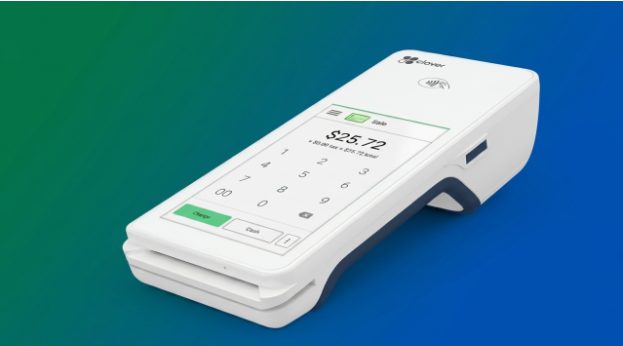
Retail businesses need accurate billing, efficient payment processing, reliable inventory information, and clear sales records to manage daily operations effectively. A modern point of sale POS system can bring many of these functions together through connected hardware and software. Instead of serving only as a digital cash register, a POS setup can become a central point for recording sales, processing payments, updating inventory, and generating business reports.
Understanding how these systems work is useful for retailers deciding what equipment and features they actually need. The right setup depends on factors such as store size, transaction volume, product range, payment methods, number of checkout counters, and whether the business operates from one or multiple locations. Current POS systems commonly combine sales processing, payment acceptance, inventory management, reporting, and other operational functions.
What Is a Point of Sale POS System?
A point of sale POS system is a combination of hardware and software used to complete and record transactions. At a basic level, the system identifies products, calculates the purchase total, records the payment, and produces a receipt.
A more advanced system can also update stock levels automatically, manage returns, maintain customer information, track employee activity, and generate sales reports. The exact capabilities vary according to the software and hardware configuration.
A typical POS environment can include a touchscreen terminal or computer, barcode scanner, receipt printer, cash drawer, payment terminal, and POS software. Some retailers may also use customer-facing displays, weighing scales, barcode printers, or mobile devices.
How Does a POS System Work?
The transaction process generally begins when an employee scans a product barcode or selects an item from the system’s catalogue. The POS software retrieves the product information, including its price and applicable tax information.
Once all products have been added, the system calculates the transaction total. Discounts or other permitted adjustments can then be applied before the customer chooses a payment method.
The payment can be completed using cash, card, contactless methods, digital wallets, or other supported methods. After successful payment, the transaction is recorded and the system can update inventory according to the products sold.
This integration reduces the need for staff to enter the same information into multiple systems. Modern POS platforms can provide real-time information about sales and stock, although the exact functionality depends on the system and its integrations.
What Are the Main Components?
The hardware and software in a point of sale POS system should work together rather than operate as isolated devices.
POS Terminal
The main terminal provides the interface for employees to access the POS software and complete transactions. It may be a desktop computer, dedicated touchscreen terminal, tablet, or other compatible device.
Barcode Scanner
Barcode scanners allow products to be identified quickly and accurately. For stores with many products, scanning can significantly reduce manual product entry during checkout.
Payment Terminal
The payment terminal handles card and other supported electronic payment methods. It may be integrated directly with the POS software or operate as a connected device.
Receipt Printer
A receipt printer produces physical transaction records where printed receipts are required or preferred. Some systems also support digital receipts.
Cash Drawer
Retailers handling cash may connect an electronic cash drawer to the POS system. The drawer can open according to configured transaction rules and helps organize cash-handling procedures.
POS Software
The software connects the different components and manages transaction data. Depending on the system, it can also provide inventory management, employee permissions, reporting, customer records, and integrations with other business applications.
Why Is Inventory Management Important?
Inventory accuracy is one of the major advantages of an integrated POS environment. When a sale is recorded, the system can automatically reduce the corresponding stock quantity.
This gives retailers better visibility into available products and can make it easier to identify low-stock items. For businesses with multiple locations, systems that synchronize inventory can provide a broader view of stock across stores.
Inventory functionality is particularly useful for businesses selling products with multiple variants, such as different sizes, colors, models, or packaging options. Modern retail POS systems can support these variations while connecting product information to sales records.
What Payment Security Measures Should Retailers Consider?
Payment security is an essential consideration when selecting POS equipment. Payment terminals are involved in capturing, processing, or transmitting payment account data and can therefore fall within the scope of applicable PCI DSS requirements. The controls required depend on the type and configuration of the device.
Retailers should use appropriately approved payment devices and validated payment software where applicable. They should also protect networks, change default passwords, restrict access, and regularly inspect payment devices for signs of tampering or unauthorized equipment.
PCI Security Standards Council guidance recommends using approved PIN-entry devices, validated payment software, network security controls, strong passwords, and regular inspection of payment devices for unauthorized modifications or skimming equipment.
Security should therefore be considered before purchasing and installing POS equipment rather than treated as a separate issue afterward.
How Should Retailers Choose a POS System?
Choosing a point of sale POS system should begin with the retailer’s actual operational requirements. A small shop with a limited product catalogue may not need the same configuration as a supermarket, department store, or multi-location retailer.
Important questions include:
1. How many transactions are processed each day?
2. How many checkout counters are required?
3. Which payment methods must be supported?
4. Does the business need barcode scanning?
5. Is real-time inventory tracking necessary?
6. Will multiple stores share inventory information?
7. Are accounting or ecommerce integrations required?
8. Does the system support appropriate security controls?
9. What happens if internet connectivity is interrupted?
10. How will hardware and software be maintained?
The goal should be to select a system that is suitable for the business’s current needs while leaving enough flexibility for expected growth.
How Does a Retail POS System Support Daily Operations?
A retail point of sale system can provide retailers with more than transaction processing. Sales information can be used to generate daily, weekly, and monthly reports, helping managers understand sales patterns and product performance.
Inventory data can also support purchasing decisions by showing which products are moving quickly and which may require less frequent replenishment. Employee permissions can help businesses control access to sensitive functions such as refunds, discounts, and administrative settings.
For larger businesses, centralized information can make it easier to monitor multiple locations and compare operational performance. Modern retail POS systems increasingly connect physical-store activity with online sales and other channels, creating a more unified view of business operations.
Conclusion
A modern point of sale POS system can combine checkout, payment processing, inventory management, reporting, and other retail functions in one connected environment. Its value depends not simply on the hardware installed at the counter but on how effectively the hardware, software, payment infrastructure, security controls, and business processes work together. Before selecting equipment, retailers should assess transaction volume, product complexity, payment requirements, inventory needs, connectivity, security, and future growth. A system that matches these requirements is more likely to provide reliable day-to-day performance. For businesses comparing a retail point of sale system, the most important consideration is not the number of features available but whether those features solve genuine operational needs. Careful evaluation of functionality, compatibility, security, maintenance, and scalability can help retailers choose a POS setup that supports accurate transactions and efficient store management over the long term.
